
Introduction
With this feature you can easily save/send the selected slides of your PowerPoint presentation.

How to Save/Send Selected Slides
- Right click on the slides you want to save, send, or copy to clipboard
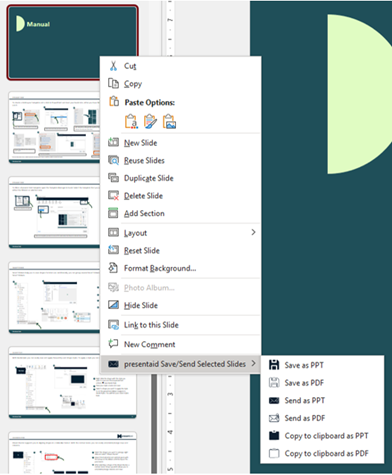
Save Selected Slides Context Menu - Choose the option you need:
- Save slides: Save the slides locally
- Send slides: Creates a mail in Outlook and attaches the selected slides to it
- Copy to clipboard: Stores the selected slides in your clipboard so you can easily paste them where you need them
- Enter a filename. By default it will use the current filename + information about selected slides + timestamp

Save Selected Slides Name
Good to Know
- Select several slides in the thumbnail pane with Ctrl+click (single slides) or Shift+click (a range).
- Send slides creates the e-mail in Outlook, so Outlook needs to be installed on your computer.
- Need the same slides again and again? Save them in the Slide Library instead.