
Introduction
With the presentaid Slide Library you can save your slides and easily add them to any other slide deck.

Save a Slide
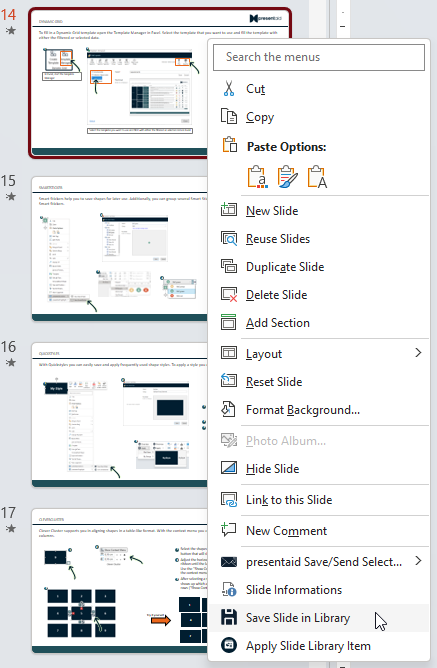
- Right click the slide(s) which you want to save in the Slide Library → Save Slide in Library
Slide Library Save - Provide a name and save your slide. If more than 1 slide is selected you can choose whether you want to save the selection as 1 library item or split it into single slide items
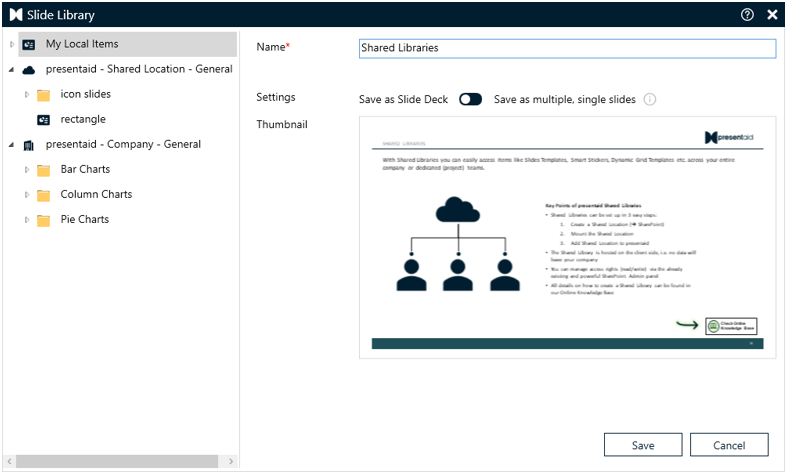
Slide Library Save Options
Apply a slide from your Slide Library
- In the presentaid ribbon, go to the Slide Library group and click Overview
- Select the slide that you want to apply to your presentation

Slide Library Apply
Good to Know
- Share slides with your team: connect a Shared Library on SharePoint. It appears as an additional folder in the Slide Library: How to Work with Shared Libraries
- Import existing slide collections: copy .pptx files into the Slide Library location and start the indexing via presentaid → About. Add "[split]" to a file name to split a deck into single slides (the original file is deleted). The steps are in the same Shared Libraries article.
- Keep inserted slides up to date: Slide Radar tells you when a slide in your deck has a newer version in the library: How to Work with Slide Radar