
Pitch Decks
Build persuasive, polished pitch decks that win meetings and close deals.
Elements Library: reusable shapes and icons for pitch decks
Key Benefits
Winning Layouts at Your Fingertips
Save your best-performing pitch layouts to the Elements Library. When building a new deck, browse and insert proven designs in seconds.
Pitch deck template library
Visual Consistency at Scale
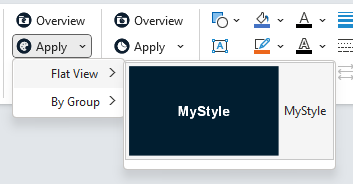
Quick Styles and Corporate Design packages ensure every pitch deck looks professional and on-brand. No more rogue fonts or wrong colors.
Data Visualization Made Easy
presentaid's Clever Cluster and auto-alignment features make it easy to create comparison tables, feature matrices, and polished data visualizations.
Clever Cluster creating a comparison table
Gantt Chart for Project Timelines
Add a professional Gantt chart to your pitch deck to show investors and clients exactly how your project unfolds. presentaid's WYSIWYG editor makes it fast to build and easy to update - no external tools needed.
Gantt Chart in a pitch deck
Charts That Make the Argument
A pitch chart has one job: make the point before anyone reads the axis. presentaid gives you the chart types that do that - a waterfall showing where the value comes from, a Mekko sizing a market by two dimensions at once, a butterfly putting you next to the incumbent. Then it lets you annotate the number: a CAGR arrow across the growth years, a difference arrow between two bars, a target line across the plot.
Chart types for pitch decks
Send a Deck That Gets Through
Pitch decks are full of high-resolution photos, product shots and screen recordings - and then the e-mail to the client bounces. The File Size Inspector shows which slides and pictures carry the weight and how much each fix saves. Compress Pictures saves a smaller copy at the resolution you choose, so you send a lean deck while keeping the full-quality original for presenting.
File Size Inspector shrinking a pitch deck
Trusted by Professionals Worldwide
See why leading companies choose presentaid for their presentations.
5.0 / 5 · 3 reviews
PowerPoint add-in for teams that produce many branded decks
"presentaid brings layout, brand control, charts and reporting into the PowerPoint Ribbon. Its files stay native PowerPoint, so colleagues without the add-in can still edit them. The recent additions are useful: Design Checker for brand consistency, Charts with waterfall and Mekko, Dynamic Grid V2 with SharePoint and pivot table sources, and a File Size Inspector."
Klare Effizienzsteigerung in PowerPoint / Office 365
"presentaid liefert Consulting-Grade-Charts, die sich direkt in PowerPoint und Excel einbetten lassen. Für unser monatliches SteerCo funktioniert die Aktualisierung der Charts jetzt auf Knopfdruck. Früher war das jeden Monat Handarbeit. Auch bei neuen Slide Decks spare ich Zeit. Die lange Suche nach einer Vorlage entfällt, weil ich die freigegebene Unternehmensvorlage immer direkt zur Hand habe. Farben und Folienbibliothek sind im Tool verfügbar, ich starte also jedes Mal von einer guten Basis und baue ohne Mehraufwand Corporate-Design-konforme Folien. Insgesamt spart presentaid mir pro Woche mehrere Stunden bei Slide Design und Polishing."
Review in German
Julia M.
Head of RnD, Electrical/electronic manufacturing (501–1000 employees)
Verified review on Capterra · Oct 31, 2026A good tool for efficiency-focused presentation creation.
"Intuitive layout and carefully considered features for use in strategy consulting. The UI is easy to navigate and offers no features lacking compared to other add-ins, while still providing practical additional features. One gets the feeling that the features and roadmap are very closely aligned with the daily work of highly efficiency-oriented teams."Translated by Capterra
"With presentaid we have found a great helper, which really simplifies and speeds up our daily work with PowerPoint. And this, although we already use 2 other add-ins. But in fact, we haven't come across a tool before that groups, centers and aligns objects as quickly and easily as presentaid."
Dr. Michael Streng
Founder, parameta GmbH
"presentaid offers convincing simplifications in dealing with PowerPoint and Excel. Editing slides and shapes is clearly faster. I don't want to miss it anymore 😉. Thanks also for the excellent support with questions - fast and competent."
Petra Dürr
Head of PMO, Robert Bürkle GmbH
"presentaid cut our report creation time by 70%. What used to take hours now takes minutes — and looks better than ever."
Sarah K.
Senior Project Manager, Deloitte
"The auto-alignment feature alone justified the investment. Our slide decks are now pixel-perfect every single time."
Marcus W.
Management Consultant, McKinsey & Company
The CAPTERRA logo is a service mark of Capterra, Inc. and/or its affiliates and is used herein with permission. All rights reserved. Capterra reviews constitute the subjective opinions of individual end users based on their own experiences and do not represent the views of Capterra or its affiliates. The reviews constitute the subjective opinions of individual end users based on their own experiences and do not represent the views of Capterra, Inc., Nubera EBusiness S.L., Software Advice, Inc., or its affiliates.
Ready to Get Started?
Try presentaid free for 30 days.