
Auto Alignment
Select objects, click once - pixel-perfect alignment every time.
Auto-alignment distributing shapes evenly
Key Benefits
Instant Distribution
Select your shapes, click Distribute - and presentaid spaces them evenly across the slide. No math, no guides, no trial-and-error.
The Productivity Pane
The Productivity Pane puts alignment, sizing, and positioning tools in one convenient panel. Set exact dimensions and spacing without digging through menus.
Productivity Pane interface
Clever Cluster Alignment
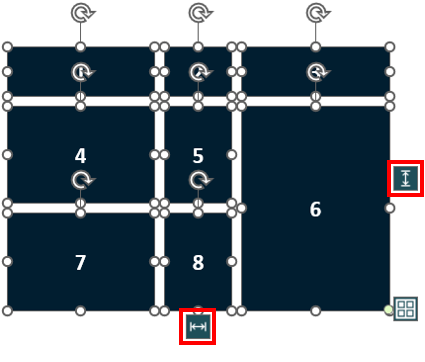
For complex layouts, the Clever Cluster arranges shapes in a table-like grid. Add, remove, and merge cells - then auto-align the entire cluster.
Clever Cluster creating a grid layout
Trusted by Professionals Worldwide
See why leading companies choose presentaid for their presentations.
"With presentaid we have found a great helper, which really simplifies and speeds up our daily work with PowerPoint. And this, although we already use 2 other add-ins. But in fact, we haven't come across a tool before that groups, centers and aligns objects as quickly and easily as presentaid."
Dr. Michael Streng
Founder and Partner, parameta GmbH
"presentaid offers convincing simplifications in dealing with PowerPoint and Excel. Editing slides and shapes is clearly faster. I don't want to miss it anymore 😉. Thanks also for the excellent support with questions - fast and competent."
Petra Dürr
Head of PMO, Robert Bürkle GmbH
"presentaid cut our report creation time by 70%. What used to take hours now takes minutes — and looks better than ever."
Sarah K.
Senior Project Manager, Deloitte
"The auto-alignment feature alone justified the investment. Our slide decks are now pixel-perfect every single time."
Marcus W.
Management Consultant, McKinsey & Company
"Rolling out presentaid across 100+ users was seamless. Corporate design compliance went from 40% to nearly 100%."
Julia M.
Marketing & Communications, Deutsche Bank
Explore More Features
Ready to Get Started?
Try presentaid free for 30 days.