

Every Deck Is a Brand Touchpoint
Long before a client re-reads your website copy, or an investor revisits your one-pager, they are sitting across from a PowerPoint deck. For most B2B companies, agencies, and advisory firms, the slide deck is the single most frequently produced piece of brand-facing content - far more common than a new landing page, a press release, or a client-facing PDF. It gets presented in board rooms, pitches, steering committees, and client workshops, often several times a week.
That makes every deck a brand touchpoint whether you intend it to be or not. A polished, on-brand, up-to-date presentation quietly signals competence and attention to detail. A deck with three different shades of blue, a stray font next to your brand's typeface, or - worse - a slide still showing numbers from two quarters ago, signals the opposite. And it does so at the exact moment your audience is deciding whether to trust you.
Two Silent Risks in Every Slide Library
Ask any team that produces a lot of decks - consulting, PMOs, marketing, sales - and they will tell you that quality erodes in two distinct ways, both quiet and both cumulative.
1. Brand drift. Every deck starts from a template that is perfectly on-brand. Then it gets copied, edited by five different people, merged with slides from another deck, and finished under deadline pressure. Fonts get swapped by accident. A shape gets filled with "whatever blue looked closest." A title box gets nudged half a millimeter and never quite matches the layout again. None of these are big mistakes on their own - but they compound, deck after deck, until "on brand" becomes an aspiration rather than a rule.
2. Content drift. The second risk is less visible but arguably more dangerous: slides going stale. Once a great slide exists - a market overview, a methodology slide, a case study - teams reuse it constantly, often by copying it out of a shared slide library. That is exactly what a slide library is for. But the moment the original slide gets an update - a corrected chart, a refined message, a new logo - every copy already sitting in someone else's deck silently falls out of date, with no signal telling anyone it happened.
Why This Is So Hard to Control Manually
Both problems have an obvious "solution" on paper: have someone check every deck against the brand guidelines, and have someone flag every reused slide when its source changes. In practice, this does not scale.
- Decks pass through many hands over their lifetime, and the brand guidelines live in a PDF nobody has open while editing.
- The bigger a slide library gets, the more places a single "master" slide can be copied into - and the harder it becomes to know where all the copies live.
- Manual review takes real time, and it is usually skipped exactly when it matters most: the night before the client meeting, the hour before the board call.
- The person editing a slide today may have no idea whether it was ever changed centrally, or that a "current" number is now three revisions out of date.
The result is the 40-60% brand compliance most organizations quietly live with - and slide libraries full of copies that nobody is quite sure are still accurate.
Closing Both Gaps, Automatically
This release adds two new presentaid features that tackle exactly these two risks - one for brand drift, one for content drift.
Design Checker: An Automated Proofreader for Your Slide Design
The Design Checker scans your presentation the way a meticulous design reviewer would - but in seconds, and every time you ask it to. It checks fonts, colors, bullet formatting, title and footer consistency, shapes sitting outside the slide, orphaned footnotes, double spaces, mixed quotation marks, and more, all compared against your deck's own theme or - for larger organizations - a company-wide design standard defined by an admin.
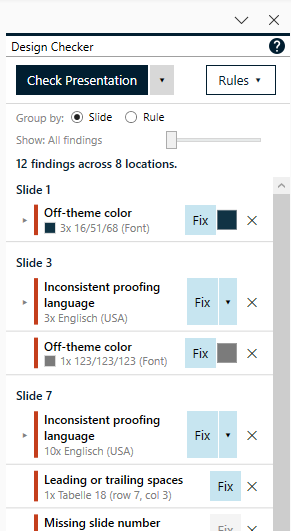
Every finding can be fixed with a single click, jumped to directly on the slide, or ignored if it was intentional. Nothing about this replaces human judgment - it simply removes the tedious part of checking two hundred slides by eye before every important meeting.
Slide Radar: Never Present an Outdated Slide Again
The Slide Radar solves the second half of the problem. Whenever a slide is copied out of your Slide Library, presentaid quietly keeps track of where it came from. If the original slide in the library is later updated, Slide Radar lets you know - automatically when you open the presentation, or on demand - and shows your current version next to the updated one so you can decide whether to sync it.
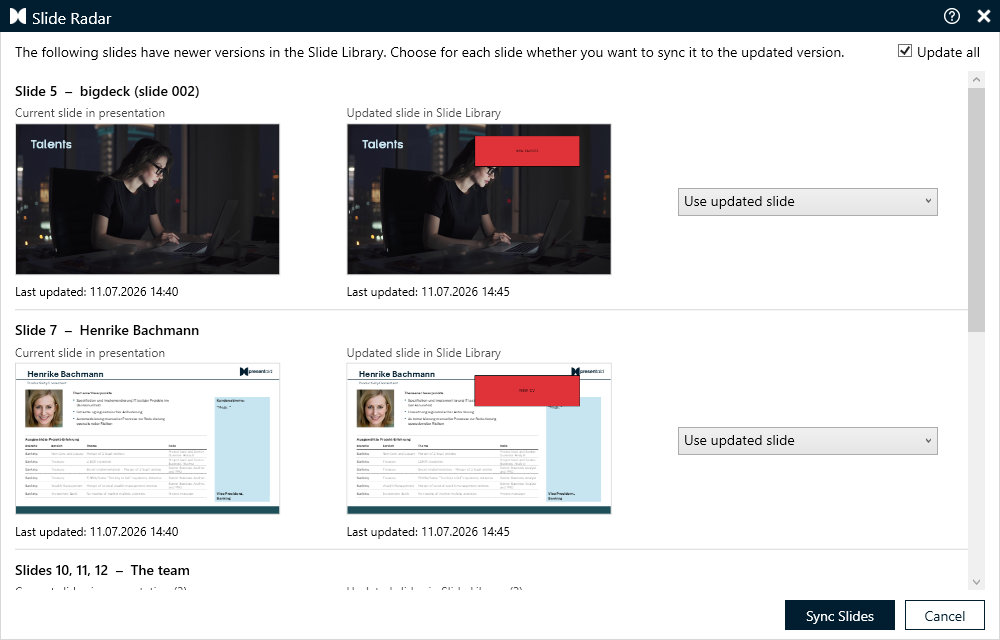
For slides reused across dozens of presentations - case studies, methodology slides, standard disclaimers - this turns "I hope someone remembers to update this" into an automatic notification.
Two Features, One Underlying Principle
Design Checker and Slide Radar solve different problems, but they share the same premise: brand consistency and content accuracy should not depend on someone remembering to check. Design Checker keeps every slide visually on-brand the moment you build it. Slide Radar makes sure the content behind a reused slide keeps pace with reality, even months after it was first copied.
Together, they close the two quietest ways a slide deck loses credibility - without adding a single manual step to your workflow.
Both features are available now as part of the presentaid Insider program - enable it under About → Insider Program in the presentaid ribbon, then find Design Checker and Slide Radar in the new Proofing group. If you want a full walkthrough first, start with the Design Checker guide and the Slide Radar guide in our Knowledge Base.