
Einführung
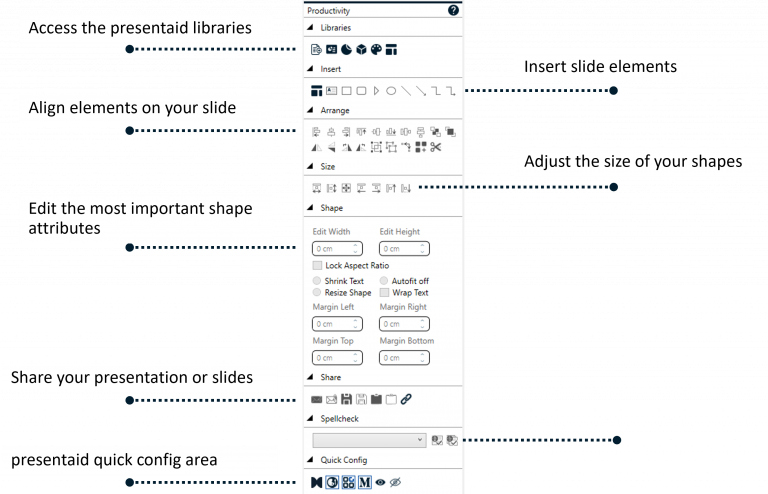
Das Productivity Pane liefert dir alles, was du brauchst, um in kürzerer Zeit mehr zu erledigen:
- Sammlung der wichtigsten Funktionen für Einfügen, Ausrichten und Größenanpassung
- Direkter Zugriff auf Form- und Textfeld-Attribute: normalerweise irgendwo im PowerPoint-Panel versteckt
- presentaid-Bibliotheken und zusätzliche Funktionen: griffbereit

Du kannst das Productivity Pane einfach ein-/ausblenden, indem du entweder auf die entsprechende Schaltfläche im presentaid-Ribbon klickst oder die Konfiguration im presentaid-Konfigurationsmenü änderst.
Funktionalität
Das Productivity Pane vereint Werkzeuge für Ausrichtung, Verteilung, Größenanpassung, Positionierung, Rotation und Abstände in einem einzigen, jederzeit zugänglichen Panel.
Mit Strg ausrichten: Master Alignment
Die sechs Ausrichten-Schaltflächen im Pane - Align Left, Align Center, Align Right, Align Top, Align Middle und Align Bottom - funktionieren auf zwei Arten:
| Was passiert | |
|---|---|
| Klick | Die PowerPoint-eigene Ausrichtung: Die ausgewählten Formen werden aneinander ausgerichtet. Eine einzelne ausgewählte Form wird an der Folie ausgerichtet. |
| Strg+Klick | presentaids Master Alignment: Die ausgewählten Formen werden an der Referenzform ausgerichtet, die selbst an ihrem Platz bleibt. Strg+Klick auf Align Left richtet zum Beispiel jede linke Kante an der linken Kante der Referenzform aus. |
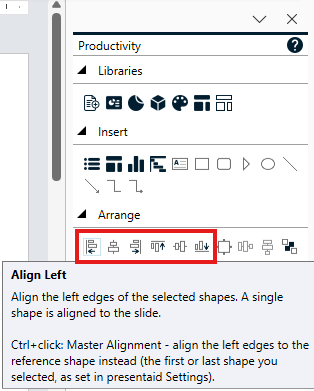
Standardmäßig ist die Referenzform die Form, die du zuerst ausgewählt hast. In den presentaid-Einstellungen kannst du unter Shape Smart Alignment stattdessen die zuletzt ausgewählte Form festlegen. Schalte Show Reference Shape flag ein, um eine kleine REF-Markierung an der Referenzform zu sehen, sobald mehrere Formen ausgewählt sind.
Ebenfalls im Pane
Diese presentaid-Funktionen öffnest du direkt aus dem Productivity Pane:
- Insert Chart: Ein Diagramm einfügen
- Gantt Chart: So arbeitest du mit Gantt-Diagrammen
- Agenda Manager: Agenda Manager
- Elements Library: So arbeitest du mit Elements
- Style Painter (Bereich Shape): Style Painter
- Slide Radar: So arbeitest du mit Slide Radar
- presentaid-Einstellungen