
Einführung
Mit dieser Funktion kannst du die ausgewählten Folien deiner PowerPoint-Präsentation einfach speichern/senden.

So speicherst/sendest du ausgewählte Folien
- Rechtsklick auf die Folien, die du speichern, senden oder in die Zwischenablage kopieren möchtest
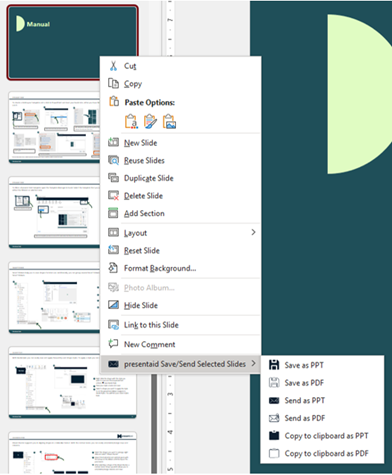
Save Selected Slides Context Menu - Wähle die gewünschte Option:
- Save slides: Speichert die Folien lokal
- Send slides: Erstellt eine E-Mail in Outlook und hängt die ausgewählten Folien an
- Copy to clipboard: Speichert die ausgewählten Folien in deiner Zwischenablage, sodass du sie einfach dort einfügen kannst, wo du sie brauchst
- Gib einen Dateinamen ein. Standardmäßig wird der aktuelle Dateiname + Informationen zu den ausgewählten Folien + Zeitstempel verwendet

Save Selected Slides Name
Gut zu wissen
- Mehrere Folien wählst du in der Miniaturansicht mit Strg+Klick (einzelne Folien) oder Umschalt+Klick (einen Bereich) aus.
- Send slides erstellt die E-Mail in Outlook, Outlook muss also auf deinem Computer installiert sein.
- Brauchst du dieselben Folien immer wieder? Speichere sie stattdessen in der Slide Library.