
Einführung
Mit der presentaid Slide Library kannst du deine Folien speichern und einfach zu jedem anderen Foliendeck hinzufügen.

Eine Folie speichern
- Rechtsklick auf die Folie(n), die du speichern möchtest, in der Slide Library → Save Slide in Library
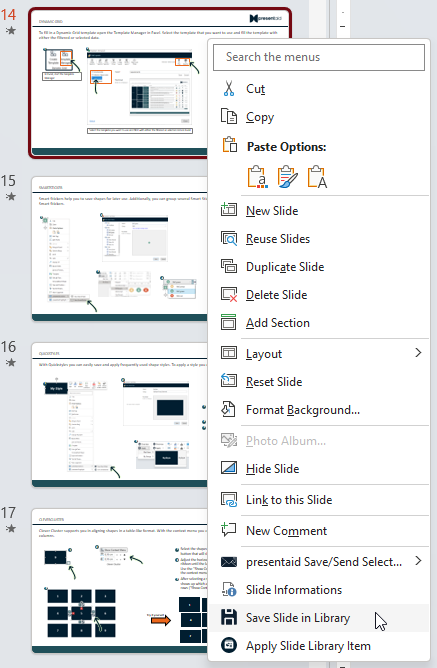
Slide Library Save - Vergib einen Namen und speichere deine Folie. Wenn mehr als 1 Folie ausgewählt ist, kannst du wählen, ob du die Auswahl als 1 Bibliothekselement speichern oder in einzelne Folienelemente aufteilen möchtest
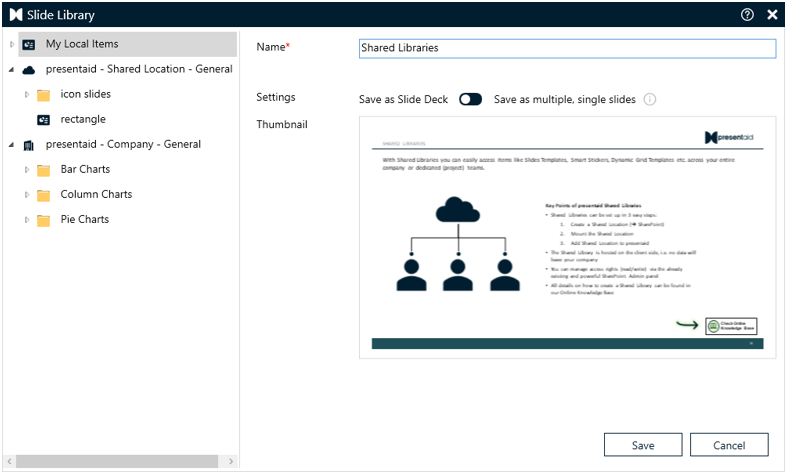
Slide Library Save Options
Eine Folie aus deiner Slide Library anwenden
- Gehe im presentaid-Ribbon zur Gruppe Slide Library und klicke auf Overview
- Wähle die Folie aus, die du in deiner Präsentation anwenden möchtest
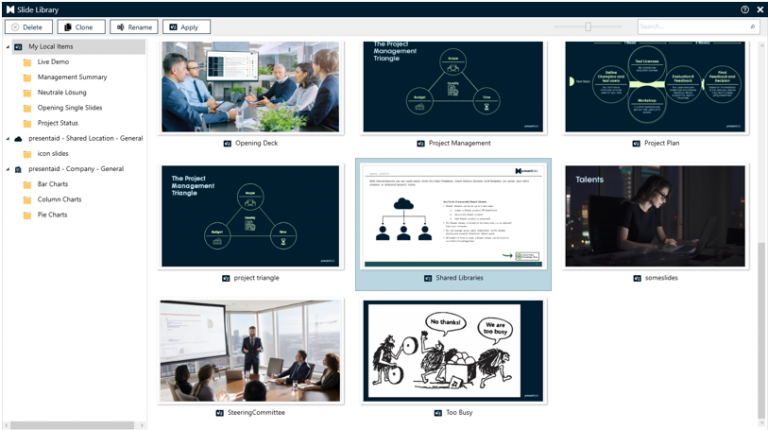
Slide Library Apply
Gut zu wissen
- Folien mit dem Team teilen: Verbinde eine Shared Library auf SharePoint. Sie erscheint als zusätzlicher Ordner in der Slide Library: So arbeitest du mit Shared Libraries
- Bestehende Foliensammlungen importieren: Kopiere .pptx-Dateien in den Speicherort der Slide Library und starte die Indizierung über presentaid → About. Mit "[split]" im Dateinamen wird eine Präsentation in einzelne Folien aufgeteilt (die Originaldatei wird gelöscht). Die Schritte stehen im selben Artikel zu Shared Libraries.
- Eingefügte Folien aktuell halten: Slide Radar meldet, wenn es für eine Folie in deiner Präsentation eine neuere Version in der Bibliothek gibt: So arbeitest du mit Slide Radar